
Troubleshooting activation errors: "License already registered on two computers"
Common Causes of the Errors
Our license policy is limited to one user per license. However, a single user is allowed to register the license on up to two computers at the same time (for example, a primary office PC and a secondary laptop). If you see an error message indicating that the key is already registered on two computers, it means your license has reached its maximum device limit for that single user.
Solutions
To resolve this issue, our support team must first release the registered slots from the authentication server. Once we have cleared the slots from our end, please follow the steps below on the computer where the error message is displayed to reactivate the plugin.
Steps:
- Open Adobe Illustrator and show "About Plug-ins (BABY-UNIVERSE INC.)" in the Illustrator menu ( Help menu on Windows. )
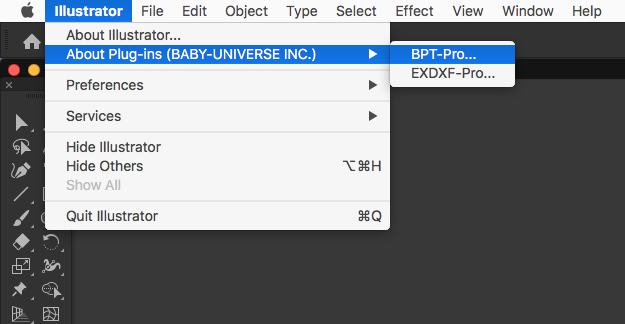
- Please click "Deauthentication" button in the dialog.
(Note: No visible change will occur in the dialog at this moment.)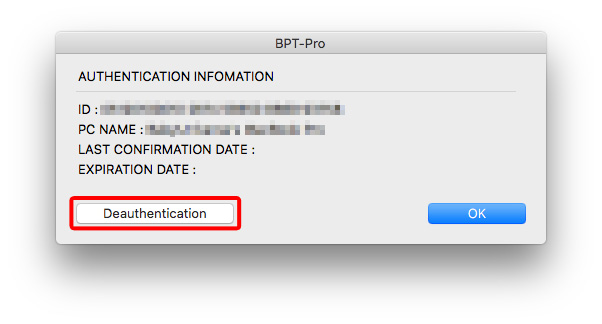
- Close Illustrator (A PC restart is not required, but please perform one if the application behaves strangely).
- Restart Illustrator.
- When the authentication dialog appears while using the plug-in, re-enter your authentication key to overwrite the existing one and complete the authentication process.
Please note that clicking "Deauthentication" updates the status to "deactivated" on the authentication server, but it does not clear the previously entered authentication key from the display.
The numbers (authentication key) will remain visible in the authentication dialog.
Therefore, when the authentication dialog appears upon using the plug-in tool, please enter the existing authentication key directly into the box to overwrite it.