Interface Language Issue in Plug-ins
Question
I am using Adobe Illustrator 2026 and I am able to use EXDXF-Pro. However, the user interface appears in Japanese instead of English, and I cannot figure out how to switch the menu to English. Can you help me?
Answer
There are two things you can check.
I. Verify the Installation Procedure (Windows)
We kindly ask you to re-install the plug-in by taking the following steps:
- Confirm that you are downloading the English version of the software.
Download URL: https://baby-universe.net/support/download_subsc/ - When downloading the installer, save the .zip file directly to your desktop.
- Right-click the downloaded .zip file and select “Extract All.”
- Open the extracted folder and double-click Setup.exe to begin installation. Please avoid installing the software manually.
Detailed Installation Guides
https://baby-universe.net/2025/09/02/plug-in-install-windows-pc/
https://baby-universe.net/2021/06/14/how-to-install-uninstall-a-plug-in/
II. Check the Language Setting Files
If the issue still persists after re-installation, could you locate the settings files in your PC?
For Windows, navigate to This PC > Documents > Adobe > Illustrator > Prefs > EXDXF-Pro
(For Mac, Documents > Adobe > Illustrator > Prefs > EXDXF-Pro )
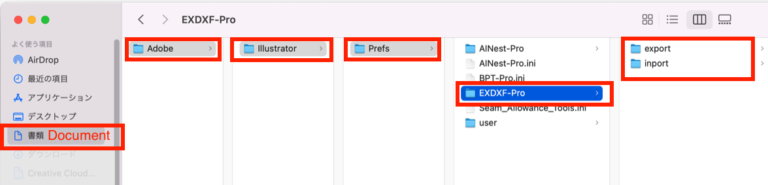
Open the setting files under the folders below:
export folder
EXDXF-pro.cnf
EXDXF-Pro.fct
inport folder
EXDXF-pro.cnf
EXDXF-Pro.fct
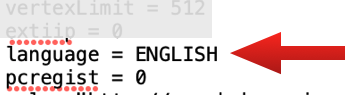
In each file, see the "language" line around the bottom. If it shows "language = JAPANESE", please overwrite it as ENGLISH and save. Please quit and restart Illustrator and try using the plug-in again and see if the issue resolves.